Too Many Spreadsheets? Run Your Small Business in One Place with Eazy-Biz
Bring quotes, invoices, expenses, projects and staff admin into one workspace with Eazy-Biz. A practical guide to moving beyond scattered spreadsheets.
Your quotes are in one spreadsheet. Invoice totals are in another. Expenses live in a file called "Expenses final v3", and the list of jobs you need to finish is somewhere in your messages.
Each file made sense when you created it. Together, they now take a surprising amount of work to keep up to date.
For a small business owner, that means time spent checking which version is correct, copying information between documents and trying to remember what still needs attention.
Eazy-Biz brings everyday business admin into one workspace, from quotes and invoices to expenses, projects and staff management. Here is what that can look like in practice, and how to start without turning the move into another big project.
The short answer
If you are entering the same information in several places, start by bringing your most frequent admin tasks together:
- Quotes and invoices: prepare client documents and keep track of their statuses.
- Income and expenses: record business transactions and review the figures.
- Projects: organise jobs, track progress and assign work.
- Team access: give colleagues access to the parts of the app they need.
- Staff admin: use payroll and leave tools on the Pro plan.
You do not need to move every historical record on day one. Start with current work, establish a weekly routine and expand from there.
When spreadsheets start creating extra work
Spreadsheets are useful for calculations, planning and one-off comparisons. The difficulty comes when several separate files become the system you rely on to run the business.
You update an invoice total but forget to change the income tracker. A colleague works from an older copy of the job list. You record a payment in your notes, then spend Friday afternoon trying to match it to the right invoice.
The problem is repeated capture and scattered information. Every extra copy gives you another place to check.
Ask yourself:
- Do I type the same client or job details more than once?
- Can I quickly see which invoices still need payment?
- Does everyone know which job list is current?
- Can I explain this month's expenses without opening several files?
If those questions take time to answer, a shared workspace can help make your routine more manageable.
1. Keep quoting and invoicing together
A client asks for a price. You prepare the quote, agree on the work and later send an invoice. Those documents share much of the same information.
In Eazy-Biz, you can create professional quotes and invoices using templates, line items, notes and payment terms. Saved business details help reduce repeated typing, while document numbers give you a clear reference when speaking to clients.
On plans that include quote-to-invoice conversion, marking a quote Accepted creates a draft invoice for you to review. You can check the details and any approved changes before sending it.
That turns the next step into a review of the agreed work, instead of another round of copying and formatting.
For the full billing journey, read From Quote to Payment: How Eazy-Biz Simplifies Your Billing.
2. See which invoices need attention
An invoice spreadsheet is only useful when you remember to update it. If the document you sent and the tracker you maintain are separate, keeping both accurate becomes another task.
Eazy-Biz keeps your invoices and their statuses together. You can review what is pending, overdue or paid without building a second list of the same invoices.
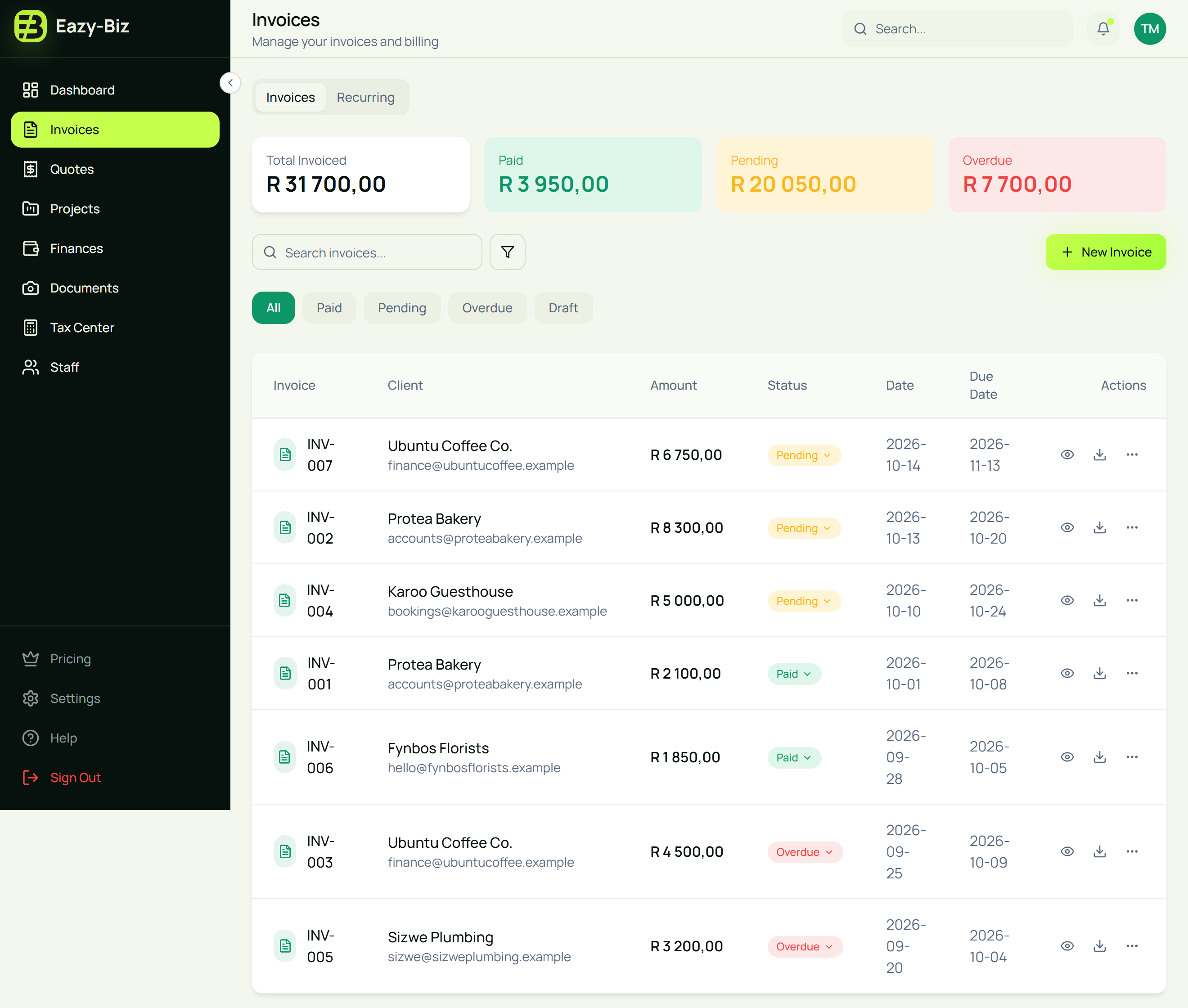
Use that list as the starting point for a regular payment check. Confirm incoming payments, update the relevant records and follow up where needed.
For payments received outside an online payment flow, check your bank or payment provider before marking an invoice paid. A useful dashboard depends on records that reflect what actually happened.
Our guide to tracking unpaid invoices without a spreadsheet gives you a routine to follow.
3. Record expenses while the details are fresh
Small purchases are easy to forget. A delivery charge, materials for a job or a software renewal may not seem important on its own. Across a month, those costs affect what is left from your sales.
In Finances, you can record income and expense transactions and organise them into categories. Keeping those records current gives you a clearer starting point when reviewing your business figures.
For example, suppose you receive R9,000 from completed work during the week and record R2,400 in materials and delivery costs. Capturing both sides helps you understand more than the sales total alone.
The remaining R6,600 is not automatically profit: other business costs may still need to be accounted for. The useful habit is recording the transactions consistently so you have something reliable to review.
Start with a small set of categories that match your business. See how to set up expense categories for practical examples.
4. Give active jobs a clear place
Money is only one part of running the business. You also need to know which jobs are active, who is handling them and what needs to happen next.
Eazy-Biz's Projects area lets you organise work into groups, track project statuses and assign work to people. This gives your job list a place alongside your other business admin.
A small creative studio might group website projects separately from design retainers. A service business might organise work by the type of job it handles.
Choose groups that help you find work quickly. Then keep the statuses current as jobs progress. The aim is to answer a practical question: what needs attention today?
5. Share the admin with your team
As the business grows, you may need someone else to help prepare invoices, capture expenses or coordinate jobs.
Under Settings, use Team to invite colleagues and choose which modules they can access. This helps you share the work without passing separate spreadsheet copies back and forth.
Agree on responsibilities as well as access. For example, one person might prepare invoices while another checks incoming payments and updates their status.
For businesses with employees, the Pro plan also includes staff tools for employee records, payroll and leave management. These bring more of your recurring admin into the same workspace as the client-facing side of the business.
Available features and team limits depend on your subscription. Check pricing when deciding what your business needs.
What a working day could look like
Imagine you run a small maintenance business with a colleague helping on jobs. Here is how you could use Eazy-Biz throughout the day:
| When | Task | Where it happens |
|---|---|---|
| Start of the day | Review outstanding invoices and active work | Invoices and Projects |
| A new enquiry arrives | Prepare a quote with the scope and price | Quotes |
| A job is approved | Update its status and organise the work | Quotes and Projects |
| You buy materials | Record the expense and its category | Finances |
| Payment becomes due | Review and send the invoice | Invoices |
| End of the week | Check payments, expenses and unfinished work | Invoices, Finances and Projects |
These are separate tasks you manage within the app; creating a quote does not mean every project or expense record is created for you. The benefit is having a consistent place to do the work and review it.
How to move over without a complicated changeover
Start with a clear date and a manageable amount of information.
- Save your business details. Check your contact information, logo and payment details before creating client documents.
- Start with your next quote or invoice. Use real work to learn the process.
- Bring current work into view. Record the active jobs and outstanding items you need to manage, checking for duplicates.
- Capture new expenses consistently. Choose categories you will actually use.
- Set a weekly review time. Check payments, follow up on quotes and update project statuses.
Keep your older spreadsheets as historical records while you establish the new routine. You can still use spreadsheets for specialist calculations or planning when they are useful.
For a more detailed starting plan, follow your first month on Eazy-Biz.
Frequently asked questions
Do I have to stop using spreadsheets completely?
No. You can keep using spreadsheets for planning, calculations or historical records. Eazy-Biz gives everyday tasks such as quoting, invoicing, expense tracking and project management a consistent place to happen.
Is Eazy-Biz useful if I work on my own?
Yes. A freelancer or sole business owner can start with quotes, invoices and expenses. You can use team and staff features later if your business needs them and your plan includes them.
Can my team help manage the business in Eazy-Biz?
Yes. You can invite team members through Settings and choose which modules they can access. The number of available seats depends on your plan.
Do I need to move all my old records before starting?
No. You can start with new transactions and current work, keeping historical records separately. Choose a clear starting date and check for duplicate entries when bringing existing information into the app.
Are payroll and leave management included on every plan?
No. Staff tools, including payroll and leave management, are Pro features. Check the pricing page for the current features and limits of each plan.
Bring your next week of admin into Eazy-Biz
You do not need to reorganise the entire business in one afternoon. Start with the tasks you repeat most: sending quotes, preparing invoices, recording expenses and checking active jobs.
Giving those tasks a consistent home makes it easier to keep your records current and find what needs attention.
Get started with Eazy-Biz and use your next quote or invoice as the first step towards a simpler admin routine.
This article is general information for South African business owners and is not tax, legal, or financial advice. Rules and thresholds change, so confirm your position with SARS or a registered tax practitioner before acting on it.